SHARP Portal

  • Login to the Application
    • Logon Screen
    • New User
    • Forgot Password
    • First Time login in
    • Disable User
  • Faculty User
    • Faculty Dashboard
    • Projects
    • Publications
  • Admin User
    • Dashboard
    • User Management
    • Research Projects
    • Academic Unit
    • Publication
    • Downloads
  • SHARP Application Change Log
    • Change Log #1 - 10-08-2018
 
Documentation for Research Projects Portal
  • Docs »
  • Faculty User »
  • Publications »
  • List of Publications »
  • Link to Project »
  • Unlink Publication from Project
  • Edit on GitHub

Unlink Publication from ProjectΒΆ

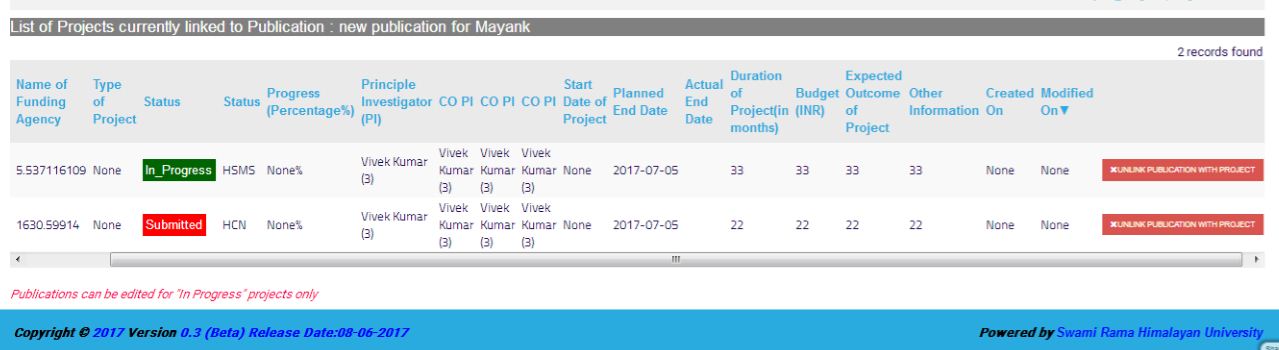
Step-1

In this image we can see linked project.
../../_images/Linked_project.JPG

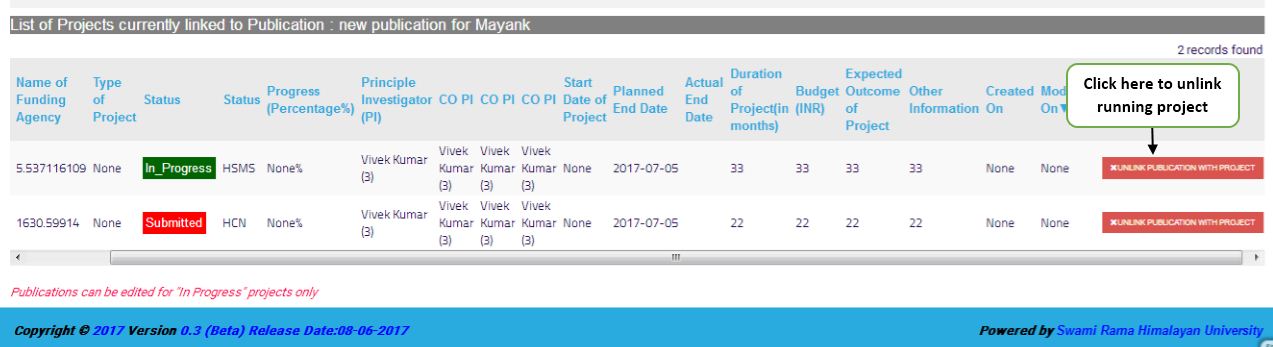
Step-2

Click on the taB UNLINK PUBLICATION WITH PROJECT to unlink project.
../../_images/unlink_project.JPG
Next Previous

© Copyright 2017-2020, SRHU.

Sphinx theme provided by Read the Docs.